
We have all been there. You go to look up a friend, an ex, or a celebrity on Instagram, but instead of their photos, you see a blank screen and a confusing message: “User Not Found.”
It can be frustrating. Did they block you? Did they delete their account? Is the app just broken?
The good news is that “User Not Found” doesn't always mean something bad happened. Often, it is a simple misunderstanding or a technical glitch. This guide will explain exactly why this message appears and how you can figure out what is really going on—without using unsafe apps or breaking any rules.
The Short Answer: Why Am I Seeing This?
When Instagram says “User Not Found,” it simply means your app cannot connect to that person’s profile right now. It usually happens for one of these five main reasons:
1. They changed their username. (Most common!) 2. They temporarily disabled their account. 3. They deleted their account permanently. 4. Instagram suspended or banned them. 5. They blocked you.
Let’s look at each one in detail so you can understand the difference.
Reason 1: They Changed Their Username
This is the most common and innocent reason. People change their Instagram handles all the time. If a user changes their name from @john_doe to @johnny_d, and you try to search for the old name (@john_doe), Instagram won't know who you are looking for. The old link is broken.
How to check:
- Go to your Direct Messages (DMs) with them. If you have chatted before, their new username should automatically update in your chat list.
- Search for their real name instead of their username.
Reason 2: Account Temporarily Disabled
Sometimes people need a break from social media. Instagram allows users to "temporarily deactivate" their account. When someone does this, their account disappears completely. It looks exactly like they deleted it, but they can come back anytime they want. Until they log back in, you will see “User Not Found.”
Reason 3: Account Deleted
If someone decides they are done with Instagram for good, they might permanently delete their account. Once an account is deleted, all their photos, likes, and followers are gone forever. If you click on their old profile link, you will see the error message.
Reason 4: Suspended or Banned
Instagram has strict rules. If an account posts inappropriate things or acts like a spam robot, Instagram might suspend or ban them. Sometimes these bans are short (24 to 48 hours), and sometimes they are permanent. While they are banned, their profile is invisible to everyone, not just you.
Reason 5: You Have Been Blocked
This is the one everyone worries about. Yes, if someone blocks you, you might see “User Not Found” when you try to visit their profile. However, blocking looks different than the other reasons. If you are blocked, the account still exists for everyone else—it is just hidden from you.
How to Tell What Is Really Happening (Safely)
You don’t need to panic. There are safe, easy ways to figure out if you are blocked or if the account is just gone.
Method 1: Use a Web Viewer (Quickest Method)
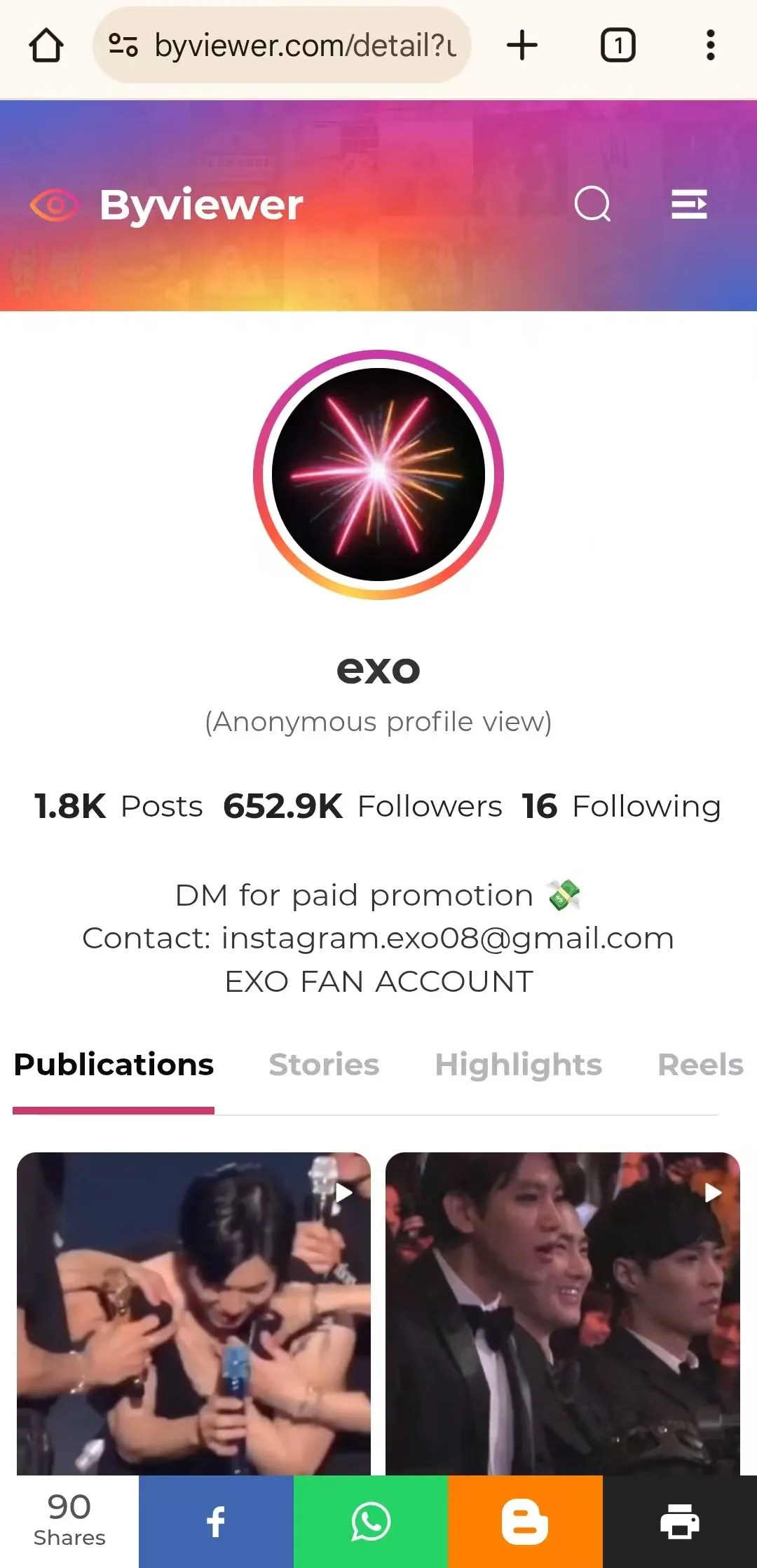
One of the fastest ways to check if a profile still exists is to use a free online viewer tool. This allows you to search for the user anonymously without needing to log out of your own account. A reliable tool for this is ByViewer.
1. Go to the website ByViewer.com. 2. Type the username of the person you are looking for in the search bar. 3. Click the search button.
The Result:
- If their profile loads: The account is active and alive. If you can see it here but not in your app, it strongly suggests you have been blocked.
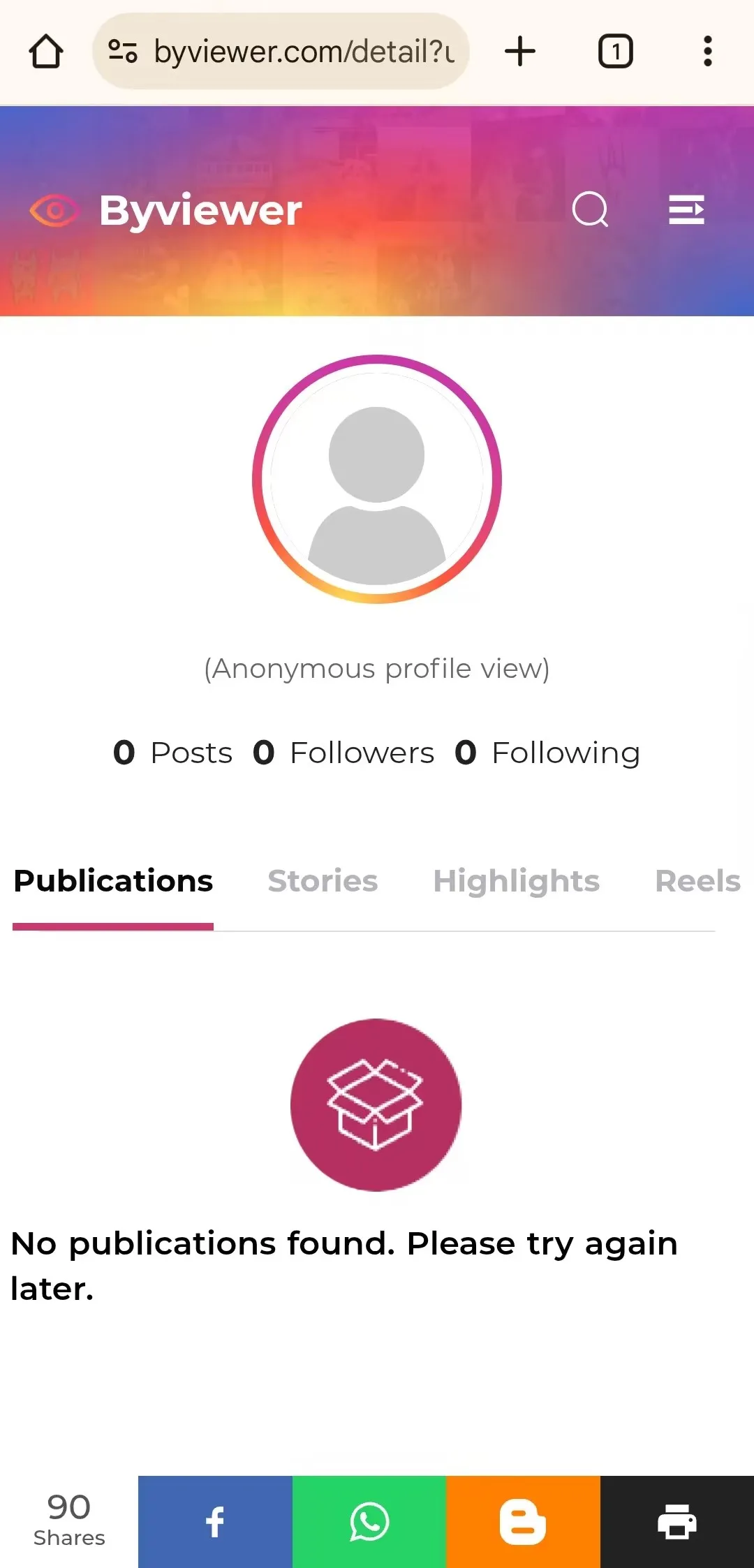
- If the tool says "No publications found": The account is likely disabled, deleted, or banned for everyone, not just you.
Method 2: Ask a Friend
Ask a friend who also uses Instagram to search for the person.
- If your friend can see the profile but you cannot, you are likely blocked.
- If your friend also sees "User Not Found," the account is down for everyone.
Method 3: Check Your Old DMs
If you have messaged this person before, go to your inbox.
- If you are blocked: You can usually still see your old chats, but their profile picture might turn into a default grey circle.
- If they deleted their account: The name might change to something generic like “Instagram User.”
Could It Be a Glitch? (How to Fix It)
Sometimes, nobody blocked you and nobody deleted anything. Instagram is a huge app, and sometimes it just breaks. If you think this is a technical error, try these quick fixes:
- Check Your Internet: If your Wi-Fi is weak, Instagram might fail to load profiles. Switch to mobile data and try again.
- Update the App: An old version of Instagram can cause search errors. Go to the App Store or Google Play Store and update Instagram.
- Log Out and Log In: Go to your settings, log out, and log back in. This refreshes your connection to Instagram’s servers.
What NOT To Do
When you see this error, it is easy to get anxious, but there are a few things you should avoid to keep your own account safe.
- Do NOT use "Who Blocked Me" apps: These apps often ask for your password and can get your own account hacked or banned. Stick to web viewers like the one mentioned in Method 1 which do not require a login.
- Do NOT create fake accounts to harass people: If you discover you have been blocked, it is best to respect the other person's decision. Using a second account to contact them can be seen as harassment and can get you banned from Instagram completely.
Conclusion
Seeing “User Not Found” is confusing, but it is rarely a mystery. Most of the time, the user has simply changed their name, taken a break, or the app is having a hiccup. By using a quick tool like ByViewer or asking a friend, you can find the answer in seconds.
If the account is gone, don't worry. Whether it is a technical issue or a personal choice, the best thing to do is wait it out or move on to other content. Instagram is a big place!